Decide it up front. Then let the AI build without hesitation.先に、決め切る。 あとは、迷わず作らせる。
Hand a vague task to an AI and you watch it guess, drift, and silently make the wrong call — and you redo the work later. spec front-loads every decision into one file your agent can follow, so it builds straight through, and pauses only when a call is genuinely yours to make.曖昧な依頼を AI に渡すと、推測し、脱線し、聞いていないことまで勝手に決め —— そして、あとで手戻りになる。spec は決めるべきことを先に1つのファイルへ固め切るので、AI は迷わず作り進み、本当にあなたにしか決められない時だけ、手を止めて確認します。
$cp -r spec ~/.claude/skills/
Apache 2.0 · Claude Code skill · one file · zero dependenciesApache 2.0 · Claude Code の skill · ファイル1つ · 依存なし
claude code — /spec
you > /spec a menu-bar app that warns me when my Mac is throttled
spec > reads your repo, harvests the chat — asks only what it can't infer
Round 1 · directionQ. When is this "a success"? → warned in time to act ok recommended
Q. Just you, or shipping it? → personal
self-check passed a fresh agent could build this from the spec alone
approve? here is the full spec — 13 sections — approve / revise / defer
you > approve & start
spec > building straight through — it pauses only if a call is truly yours
AC-1 swift build → exit 0 ok
AC-2 throttle simulated → icon red in 2s okdone. command, output, exit code logged in §13
you > /spec Mac が熱で絞られたら知らせるメニューバーアプリ
spec > リポジトリと会話を読み、調べても分からないことだけ聞く
ラウンド1 · 方向Q. これが「成功」なのはどんな時? → 手遅れになる前に気づける ok 推奨
Q. 自分用? それとも配布? → 自分用
自己チェック完了 この仕様書だけで、別の AI が作れる状態
承認? 仕様書の全文 —— 13項目 —— 承認 / 修正 / あとで
you > 承認して開始
spec > 迷わず作り進む —— あなたにしか決められない時だけ、手を止めて確認
AC-1 swift build → exit 0 ok
AC-2 熱を模擬 → 2秒でアイコンが赤 ok完了。コマンド・出力・終了コードを §13 に記録
§ At a glance§ ひと目で
Numbers you can check yourself.自分で確かめられる数字だけ。
1
fileファイルthe whole skill is one prompt — SKILL.mdskill の中身は、この SKILL.md 1つです
0
dependencies依存なしno build step, no runtime to installインストールもビルドも要りません
13
spec sections仕様の項目every spec, the same fixed shapeどの仕様書も、同じ 13 項目の決まった形
2
checkpointsつの関門a "could a fresh agent build it?" self-check, then your approval「別の AI でも作れる?」の自己チェックと、あなたの承認
The wrong call, made silently, mid-build.手戻りは、実装の途中で黙って決めたことから生まれる。
The expensive part of working with an AI agent often isn't the coding — it's the rework. A decision gets made silently while it builds, and the wrong assumption only surfaces after the code is written. spec moves those decisions to the front, where changing your mind is cheap, and writes them down so nothing has to be re-explained.AI エージェントで時間を失う大きな原因は、コードを書くことではなく、手戻りです。実装の途中で判断が黙って下され、間違った思い込みはコードができてからやっと表に出てきます。spec はその判断を、まだ安く直せる「最初」に動かし、文章として残します。だから、同じ説明を何度もしなくて済みます。
Moment場面
Without /specspec なし
With /spec/spec を使うと
Kickoff着手
"Build X" → starts coding at once「X を作って」→ すぐ書き始める
reads the repo first, asks only what it can't infer先にリポジトリを読み、調べても分からないことだけ聞く
Decisions判断
assumptions made silently as it goes進めながら、仮定を黙って積み上げる
each is a line in the spec, with a default you can reject一つひとつが仕様書の1行になり、断れる推奨案が付く
Surprises想定外
you find the wrong call after it's built間違いに、できあがった後で気づく
you see them all up front, before a line is written1行も書く前に、すべて先に目を通せる
"Done"「完成」
a stub that only looks finished見た目だけ整った、中身のない実装
a command run on a real case — output + exit code pasted実際に動かしたコマンドと、その出力・終了コードが残る
Next session次の作業
no idea what you decided何を決めたのか、もう分からない
the spec carries every decision across sessions仕様書が、すべての決定を次の作業へ持ち越す
= the behavior spec is designed to produce= spec が生み出すよう設計した振る舞い
§ How it works§ 仕組み
Two checkpoints, not good intentions.「気をつける」ではなく、2つの関門で守る。
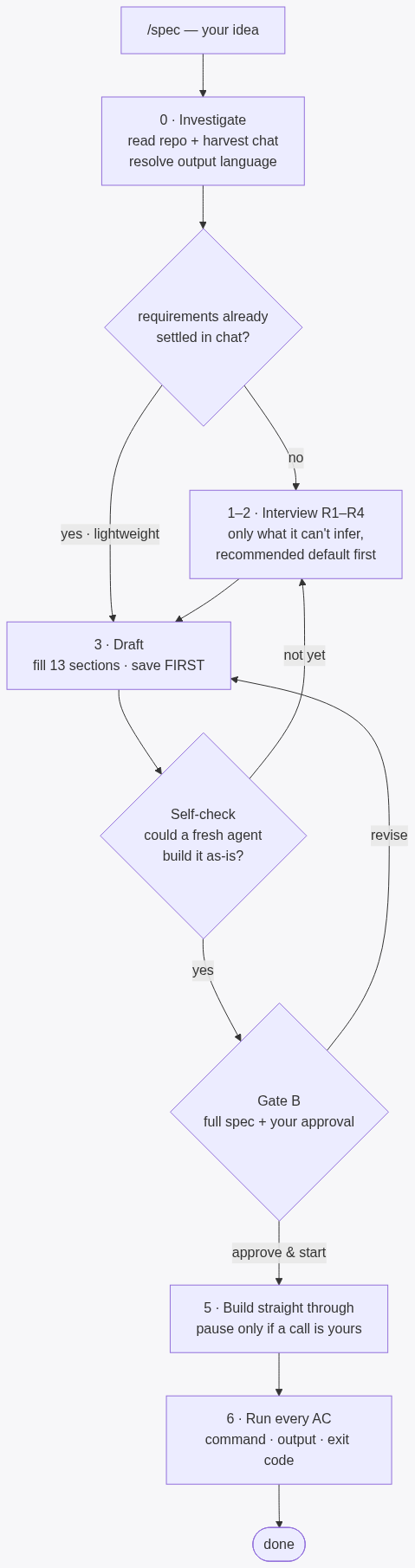
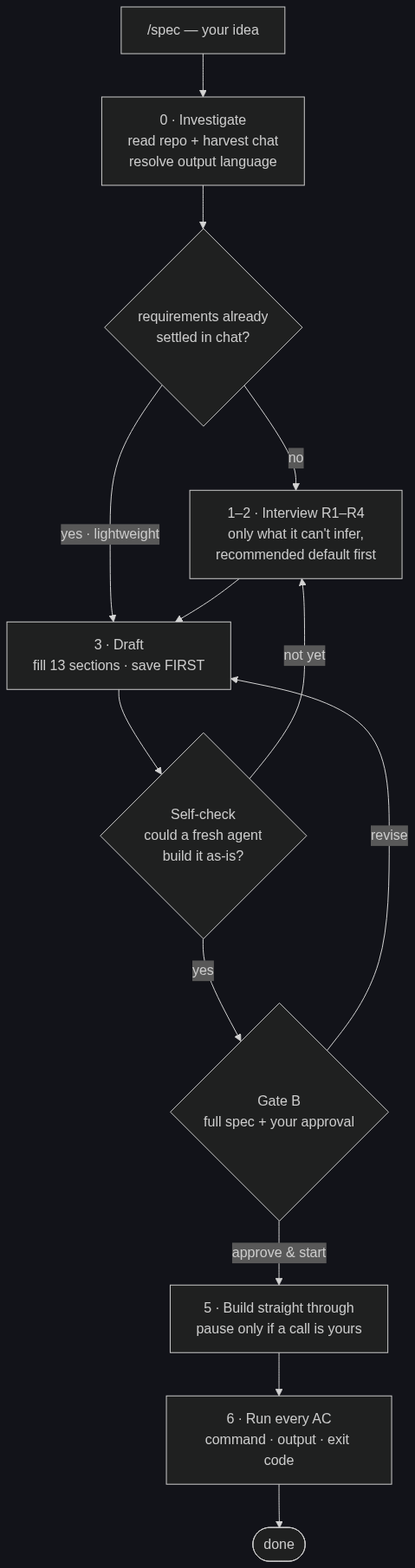
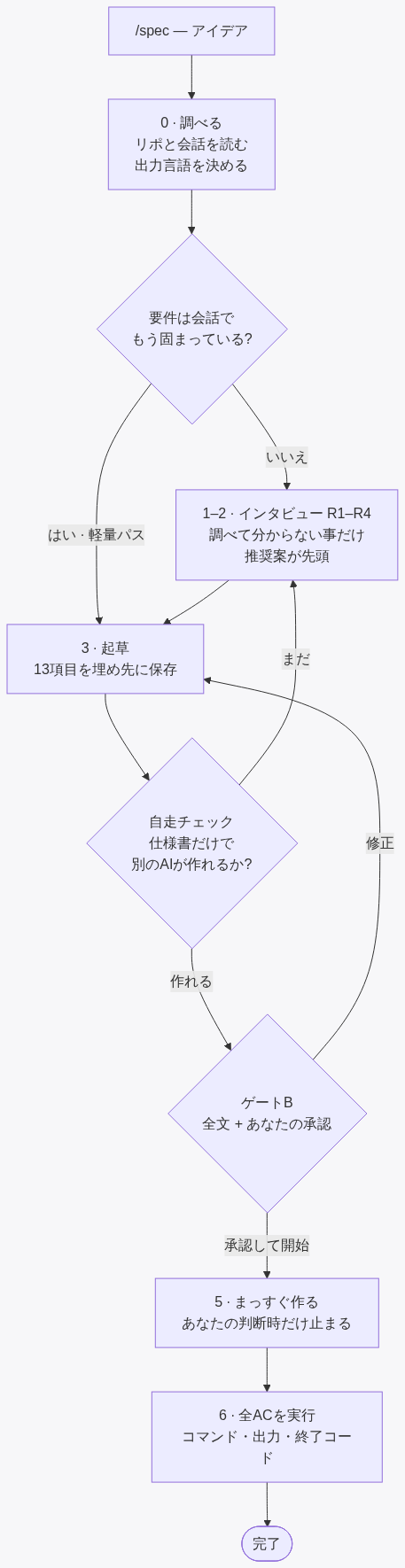
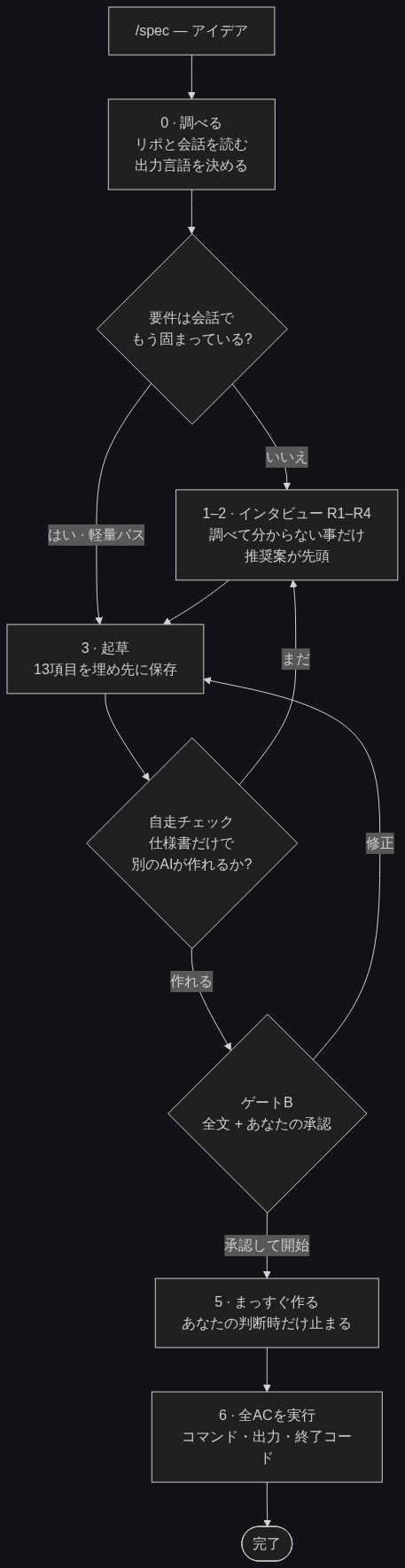
The discipline is enforced at two checkpoints. Between them, the spec is written to a fixed template and saved before you ever see it — so an interrupted session can resume from the captured answers.規律は、2つの関門で守られます。その間で仕様書は決まったテンプレートに書かれ、あなたが見る 前 に保存されます —— だから途中で中断しても、聞き取った内容を残したまま再開できます。
CHECK · A関門 · A
The self-check自走チェック
A machine check that runs before you see anything — the spec only passes if a fresh agent could build it from that file alone.あなたが何かを見る前に走る、機械的なチェックです。この仕様書だけで別の AI が作れる状態でなければ、ここを通れません。
Howやり方
The draft is handed to a fresh-context agent with only that file: "could you build this as-is?" If it still has something to ask, that's a section not yet pinned down — and it gets fixed before you're shown anything.下書きを、まっさらな状態の別 AI に そのファイルだけ 渡して「このまま作れる?」と尋ねます。まだ聞きたいことがあれば、それは詰め切れていない項目 —— あなたに見せる前に、そこを埋めます。
Fallback代替手段
No sub-agents in your setup? It degrades to a 12-point self-audit that must quote one grounding line per section — a section it can't quote is treated as not done.別 AI を呼べない環境では、12 項目の自己点検 に切り替わります。各項目について根拠の1行を引用できなければ、その項目は未完成とみなされます。
CHECK · B関門 · B
Your approvalあなたの承認
The one place a human decides. The full spec is shown as plain text — not a summary — and you choose what happens next.人が判断する、唯一のポイントです。仕様書の全文が(要約ではなく)そのまま示され、次にどうするかをあなたが選びます。
Choices選べること
Approve & start flows straight into implementation in the same session. Or revise a section, or approve only to resume later.承認して開始 を選べば、そのまま実装に入ります。気になる項目だけ 直す、または後で再開する 承認だけ も選べます。
During the build実装のあいだ
It builds straight through, without re-asking what's already settled. It does stop to check on the things that deserve it: the irreversible (deleting data, publishing, spending) and a new fork only you can decide. The goal isn't silence — it's asking at the right moment.決まったことを聞き直さず、まっすぐ作り進みます。その一方で、確認すべきことは ちゃんと止まって聞きます —— 後戻りできない操作(データ削除・公開・課金)や、あなたにしか決められない新しい分岐が出た時です。目指すのは「黙って進むこと」ではなく、「正しいタイミングで聞くこと」です。
§ The discipline§ 貫いていること
Investigate before you ask. Once you ask, write it down. Once approved, run it to the end.調べてから聞く。聞いたら書く。承認されたら、最後まで走り切る。
01
Don't ask what you can find out調べれば分かることは聞かない
"What language is this project?" wastes a question and erodes trust. The questions it does ask are the ones only you can answer — each with a recommended default you can reject in a tap.「このプロジェクトの言語は?」のような質問は枠の無駄で、信頼を損ねます。実際に聞くのは、あなたにしか答えられないことだけ —— どれも、ワンタップで断れる推奨案つきです。
02
No agreement without a number数字のない合意はしない
"Fast" isn't settled until it's "within N seconds". Performance, limits, and cost are pinned to numbers — seconds, counts, yen — before they count as decided.「速い」は「N秒以内」になるまで決まったことにしません。性能・上限・コストは、秒・件数・円のような数字に落ちて初めて、確定とみなします。
03
No "done" without evidence証拠のない「完了」はない
The implementation log holds the real command, its output, and the exit code — not "it should work". A feature is done only after it's been run on a real case, and you can see the proof.実装ログには、実際のコマンドと出力、終了コードが残ります —— 「動くはず」ではなく。実際のケースで動かし、その証拠を見られて初めて、完了です。
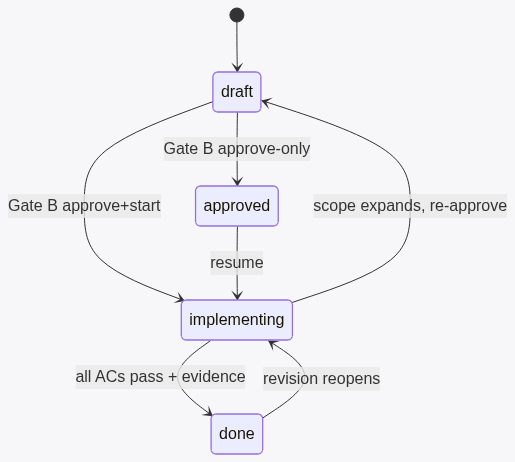
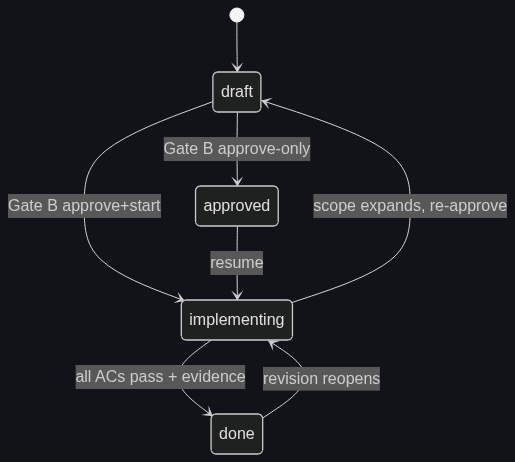
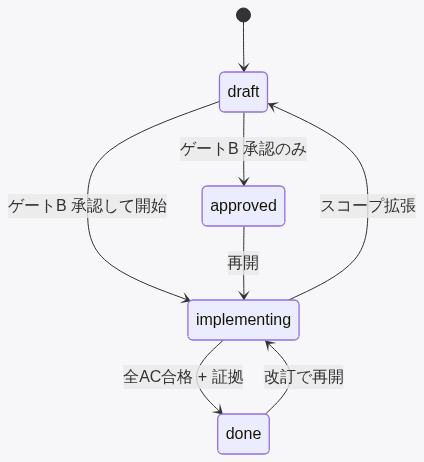
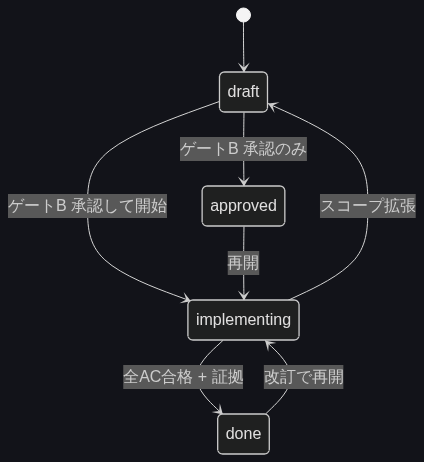
There is no engine. The "logic" is a set of rules the agent follows; the checks force them to hold. Every state transition is a real edit to the spec's status line, which is what lets an interrupted session resume exactly where it stopped.特別なエンジンはありません。「仕組み」とは AI が従う一連のルールで、関門がそれを守らせます。状態の移り変わりはすべて、仕様書の status 行を実際に書き換えることで起こる —— だから中断しても、止まった所からそのまま再開できます。
The loop全体の流れ
The lifecycle (4 states)状態の移り変わり(4状態)
§ What's in a spec§ 仕様書の中身
13 sections. The same shape every time.13 の項目。毎回、同じ形。
§12 is two-layered on purpose: your decisions (D) are treated as settled, while AI placeholders (T) stay visible so you keep a veto — even mid-implementation.§12 は、わざと二段構えにしています。あなたが決めたこと(D) は決定済みとして扱い、AI の仮置き(T) は見える形で残るので、実装の途中でもあなたが覆せます。
§§
Section項目
§§
Section項目
1
Purpose & definition of success目的と、成功の定義
8
Non-functional requirements (numeric)非機能要件(数値で)
2
Users & context使う人と、使う場面
9
Environment, constraints, prohibitions環境・制約・禁止事項
3
Scope (do / won't-do)範囲(やる / やらない)
10
Integration with existing assets既存の資産との統合
4
I/O & interface入力・出力と、操作方法
11
Acceptance criteria (executable)受け入れ基準(実行できる形で)
5
Main flow & state主な流れと、状態
12
Decision log — yours (D) vs AI (T)決定の記録 —— 本人(D)と AI(T)
6
Data & persistenceデータと、保存
13
Implementation log & evidence実装ログと、検証の証拠
7
Error handling & worst-case異常時の方針と、最悪の事故
§ Get started§ はじめる
One file. Drop it in.ファイル1つ。置くだけ。
The skill is a single SKILL.md — no build, no dependencies. Start a new Claude Code session and /spec is live.skill は SKILL.md 1つだけ —— ビルドも依存もありません。Claude Code を開き直せば、/spec が使えます。
terminal
# Clone, then copy the skill into Claude Codeclone して、Claude Code の skills に置く
git clone https://github.com/dualform-labs/spec-skill.git

# User scope — available in every projectユーザー全体 —— どのプロジェクトでも使える
cp -r spec-skill/skills/spec ~/.claude/skills/

# Then, in Claude Code:あとは Claude Code で:
/spec Mac が熱で性能を絞られたら教えてくれるメニューバーアプリ
Choose the output language生成される言語を選ぶ
By default spec writes the spec and its questions in the language of your conversation (auto). To pin Japanese or English, edit one line in skills/spec/config.yml — output_language: auto | ja | en. Code, commands, and slugs remain English by design.既定では、仕様書も質問も会話の言語(auto)で書かれます。日本語か英語に固定したいときは、skills/spec/config.yml の1行 output_language: auto | ja | en を書き換えるだけ。コード・コマンド・slug は、設定にかかわらず英語のまま扱います。